iTakeApart · Flagship Phones & Wearables · iPhone screen repair · model by model
iPhone Screen Repair and Replacement, Model by Model
How each screen comes off, the edge its cables fold over, what must move to the new screen and what it costs to do yourself or at Apple, from our 3D guides of the iPhone 13, the iPhone 14 Pro Max, the iPad 9 and the iPhone Duo.
What every screen repair has in common
Heat, a gap and a shallow pick
Warm the edges to soften the adhesive, lift a gap with a suction cup and slide a plastic pick under the screen’s edge, never deeper than the guide marks: 2 mm along the edge where the cables run, 3 mm elsewhere on the iPhone 13 and 14 Pro Max. A new adhesive seal goes on before it closes.
Open it over the cable edge
A screen opens like a book over the edge its cables leave from, and leans on a foam block while it is unplugged. iPhone 13: from the side-button edge over the volume-button edge. iPhone 14 Pro Max: from its right edge over its left. iPad 9: from the Smart Connector edge over the volume-button edge. Swung the other way, or too far, its cables tear.
Battery first, then the display
Unplug the battery before the screen’s cables, every time: while it is connected the board is live, and a tool across two contacts or a connector pressed on out of line can short it. Only plastic tools near the cell.
What moves to the new screen
iPhone 13: the front sensor assembly on the old screen’s back, which iFixit lists as paired to the board and part of Face ID. iPhone 14 Pro Max: the proximity and ambient light sensor flex, if the new screen comes without one; Face ID’s TrueDepth camera stays in the frame. iPad 9: the home button, whose Touch ID is paired to the board.
Genuine screens and True Tone
On iOS 17.6 and earlier, a replaced screen loses True Tone and auto-brightness, even a genuine Apple one. On iOS 18 and later, Repair Assistant, in Settings, General, About, Parts & Service History, can calibrate a genuine Apple screen and turn them back on; our guides’ sources promise that for no other screen.
Four Apple screens side by side
| Model | Overall risk | Opens | Moves to the new screen | Screws in the 3D guide | Fix it yourself | Apple’s service | Fix or replace? At $25/hr | 3D guide |
|---|
| iPhone 13 | High | From the side-button edge over the volume edge | Front sensor assembly (Face ID) | - P2 6.8 mm ×2
- PH00 1.3 mm ×4 1.7 mm ×5
- Y000 1.4 mm ×3 1.8 mm ×1
| $69.99 | $279 | 🔴 Replace Instead — Not Worth Opening | Open 3D Screen Guide → |
|---|
| iPhone 14 Pro Max | High | From its right edge over its left | Sensor flex, if the new screen has none | - P2 6.8 mm ×2
- Y000 1.3 mm ×5 1.6 mm ×2 1.9 mm ×1
- PH000 1.4 mm ×2
| $129.99 | $379 | 🟡 Consider a Repair Shop | Open 3D Screen Guide → |
|---|
| iPad 9 | High | From the Smart Connector edge over the volume edge | Home button (Touch ID) | - PH00 1.4 mm ×3 2.3 mm ×1 4.2 mm ×4
| $54.99 | $299 | 🔴 Replace Instead — Not Worth Opening | Open 3D Screen Guide → |
|---|
| iPhone Duo | High | Inner display: cut free from inside, from the top right corner | Apple’s service: parts not yet on sale | PL1.1, trilobe and crosshead: no lengths published | No sourced figure | $999 | 🟡 Consider a Repair Shop | Open 3D Screen Guide → |
|---|
Each price is the guide’s own sourced estimate, and each verdict the Fix or Replace? calculator’s with your time worth $25/hr: pick another rate there. Figures are estimates in US dollars, read on makers’ and shops’ own pages in October 2026 and November 2026; they vary by shop and country, and the pages are listed with the guide’s sources. Compare other devices in the Fix or Replace? calculator →
Screens, traps and the 3D repair, model by model
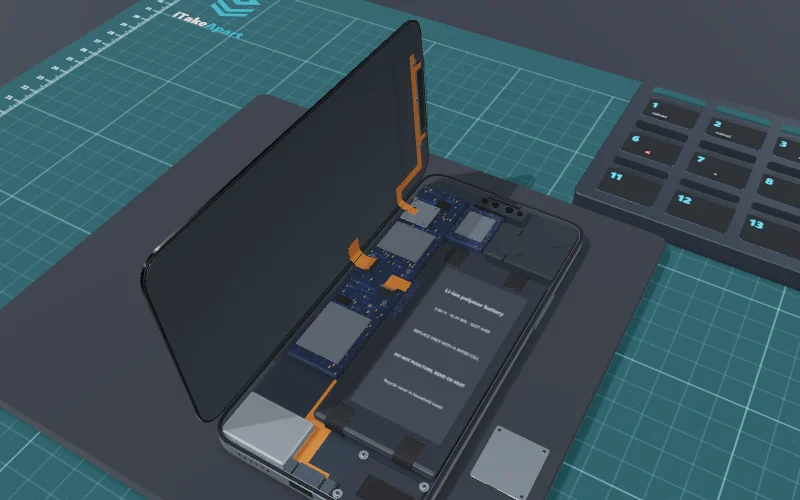
- Overall riskHigh
- TimeAbout 2 hours
DIY: screen kit from $70, battery kit $46Apple: $279 screen, $89 battery
PartiPhone 13 screen OLED; check whether its sensor assembly is fittedFind ↗
Costliest trap · step 6A 1.7 mm screw in a 1.3 mm hole
🔴 Replace Instead — Not Worth Opening The repair you would choose costs about 70% of a replacement: over our 60% line.
Open 3D Screen Guide →Fix or replace? See the verdict →
US prices, checked October 2026; they vary by shop and country.
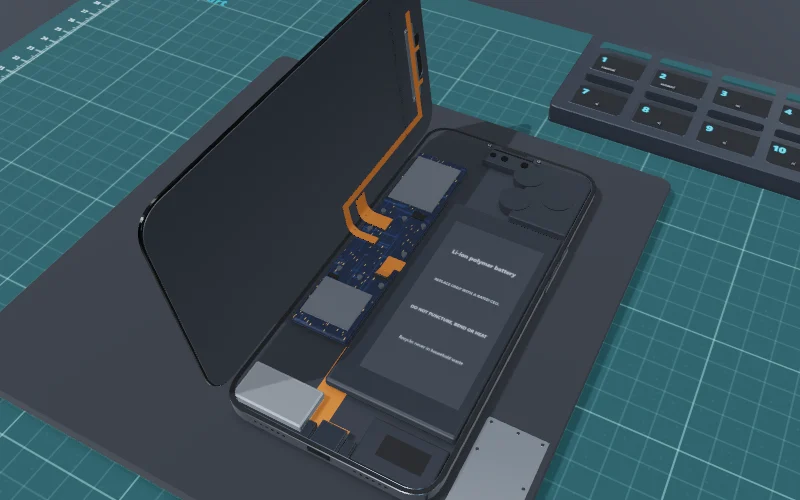
- Overall riskHigh
- TimeAbout 1 hour
DIY: OLED screen kit from about $130Apple: $379 screen repair
PartiPhone 14 Pro Max screen OLED; True Tone needs a genuine oneFind ↗
Costliest trap · step 4Inserting the pick too deep on the left edge
🟡 Consider a Repair Shop The 3D risk level is High: one slip can cost more than a shop’s fee.
Open 3D Screen Guide →Fix or replace? See the verdict →
US prices, checked October 2026; they vary by shop and country.
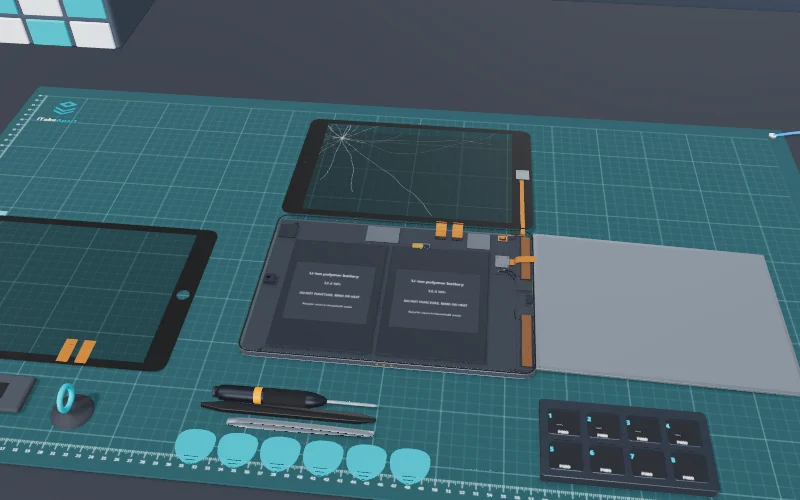
- Overall riskHigh
- Time45 min to 3 hours
DIY: the glass $50, its fix kit with tools $55Apple: $299, its other-damage fee
PartiPad 9 glass digitizer glass only, adhesive fittedFind ↗
Costliest trap · step 5Pushing the pick deep under the home button
🔴 Replace Instead — Not Worth Opening The repair you would choose costs about 139% of a replacement: over our 60% line.
Open 3D Screen Guide →Fix or replace? See the verdict →
US prices, checked October 2026; they vary by shop and country.
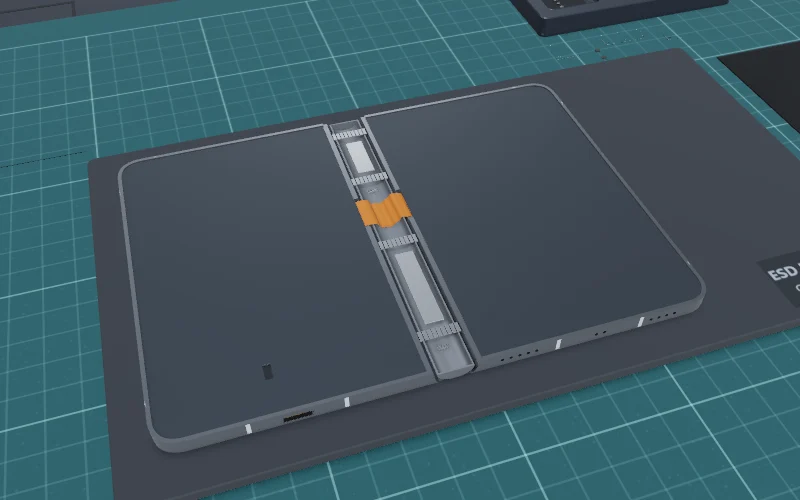
- Overall riskHigh
- Time3–5 hours (our estimate)
Costliest trap · step 11Cutting too deep at the hinge
🟡 Consider a Repair Shop The 3D risk level is High: one slip can cost more than a shop’s fee.
Open 3D Screen Guide →Fix or replace? See the verdict →
Apple’s US out-of-warranty estimates, checked November 2026; inner display $999, cover layer $49. Parts were not yet on sale for DIY.
How the verdict works: our own rules of thumb, not statistics. DIY wins when the 3D risk is low or medium and doing it yourself saves over 40% against a replacement (against a shop’s price where buying new does not apply). Replace instead when the device is sealed or potted, or the repair costs over 60% of a replacement. Consider a shop when the risk is high, the job needs soldering or it has a delicate ribbon-cable trap. Your time counts at the rate you pick. The links open a shop search; we earn nothing from them.
Screens and glass in our other iPhone guides
- iPhone 15 USB-C Charging Port ReplacementThe iPhone 15’s screen comes off the front at step 4 of our USB-C port guide: picks 3 mm deep along the volume edge, where its two cables run, and along the top, 5 mm on the side-button edge.
- iPhone 16 Battery & Back Glass TeardownOur iPhone 16 guide opens the back glass, not the screen: it swings open over the volume buttons on its coil cable, with picks no deeper than 3 mm anywhere.
No 3D guide yet
Not built yet: ask for the one you need, and we will tell you when its 3D guide is live.
Questions
Will Face ID work after an iPhone screen replacement?
On the iPhone 14 Pro Max, yes, as long as nothing at the top of the phone is damaged: its TrueDepth camera stays in the frame. On the iPhone 13 the front sensor assembly on the back of the old screen has to move across whole; iFixit lists it as paired and part of Face ID.
Why are True Tone and auto-brightness off after a screen repair?
On iOS 17.6 and earlier a replaced screen loses them, even a genuine Apple one. On iOS 18 and later, Repair Assistant, in Settings, General, About, Parts & Service History, can calibrate a genuine Apple screen and turn them back on. Auto-brightness also needs the ambient light sensor moved across unharmed.
Which way does an iPhone screen open?
Like a book, over the edge its cables leave from: on the iPhone 13 from the side-button edge over the volume-button edge, on the iPhone 14 Pro Max from its right edge over its left. Keep the pick to 2 mm along that edge, and lean the open screen on a foam block so the cables are never pulled.
Is a screen repair worth it, or should I replace the device?
Our Fix or Replace? calculator weighs it by our own rules of thumb. Apple’s iPhone 13 screen repair costs over 60% of a pre-owned iPhone 13, so it says replace; the iPhone 14 Pro Max’s comes under that line, a job for a repair shop. Apple’s fee for an iPad 9 is more than a certified refurbished one.
Is the phone still water-resistant after a screen replacement?
Only as far as the new adhesive seal holds: Apple’s IP68 rating is for the phone as it left the factory, so treat an opened phone as no longer waterproof.
Sources
Every step, screw and price on this page comes from the 3D guide it links to, where that guide’s sources are listed.